 Skip to content

“Just use the Zoom link” is bad advice for a Montgomery County family-court hearing. A connection invitation doesn't tell you whether the judge has authorized remote attendance, whether your witness may testify online, or whether you've met the filing requirements.
For parents and spouses in The Woodlands, Conroe, and Magnolia, the safer approach starts with the assigned court, not the app. Montgomery County remote hearing rules for family court are court-specific, and preparing the legal request matters just as much as testing your microphone.
Remote Hearing Rules by Court at a Glance
A Zoom link isn't permission to appear remotely. Start by identifying which court has your case and which order governs that hearing.
Remote hearing rules by Montgomery County court
| Court | Governing remote order | Default format | What you must do |
|---|---|---|---|
| 410th District Court | Standing Order Regarding Remote Appearances By Zoom, posted January 1, 2023 | Zoom appearance under the standing order | Confirm the order covers your hearing and read any hearing-specific instructions |
| 418th District Court | Standing Order Regarding Approved Remote Court Proceedings, posted September 20, 2023 | All proceedings in person by default | Obtain advance court approval; a request cannot be made ex parte |
| Other Montgomery County family courts | The assigned court's current remote-appearance order and judge-specific procedures | Use the format specified in the court's order and hearing notice | Verify authorization with the court before arranging remote attendance |
The posting dates and order titles in the table come from the Texas courts' local-rules database, which identifies separate remote-proceeding orders for the 410th District Court and 418th District Court. Don't treat the existence of an order as blanket authorization for every divorce, custody, child-support, or enforcement setting.
The 418th District Court's posted policy expressly starts with physical courtroom attendance under Texas Rule of Civil Procedure 21d(b)(1), requires advance approval for remote participation, and prohibits ex parte requests. In plain English, don't privately ask the judge for permission without involving the opposing side through the proper process.
Make these checks before changing your plans
- Identify the assigned court. Read the caption on your filed pleadings and compare it with the hearing notice. Your home address in The Woodlands doesn't identify your courtroom.
- Find the current order. Use the court's official materials and check the judge's individual procedures. A saved instruction sheet from an earlier setting may not govern the next one.
- Match the hearing type. Confirm that the authorization applies to your particular setting, not merely to another category of proceedings.
The court's location and its remote policy are separate questions. The 410th court is listed at 301 North Main, Suite 210, Conroe in its official materials; use the publisher's 410th District Court family docket procedures guide to help organize your review of that court's process.
Practical rule: Before you arrange work leave, transportation, or childcare, be able to name your court and state its default appearance rule in a sentence.
If the notice, standing order, and coordinator's instructions appear inconsistent, ask for clarification. Don't resolve the conflict by choosing whichever format is more convenient.
Filing Deadlines Before Any Remote Hearing
Seventy-two hours before a temporary-orders hearing, the disclosure is due.
A parent can prepare carefully for testimony and still face a disrupted hearing because required information wasn't filed. Under the 410th District Court's official materials, information required by Texas Family Code sections 154.181(b)(1)–(2) and 154.1815(c) must be on file at least 72 hours before a temporary-orders hearing and 14 days before a final trial, with failure potentially resulting in a continuance of the temporary hearing or dismissal at final trial. Those sanctions attach whether you appear in person or by video.
Filing and notice deadlines for remote hearings
| Event | Deadline | Authority |
|---|---|---|
| Information required for a temporary-orders hearing | At least 72 hours before the hearing | Texas Family Code §§ 154.181(b)(1)–(2), 154.1815(c); 410th District Court posted requirements |
| Information required for a final trial | At least 14 days before trial | Texas Family Code §§ 154.181(b)(1)–(2), 154.1815(c); 410th District Court posted requirements |
| Motion for remote witness testimony | Generally at least seven days before the hearing | Assigned judge's Montgomery County judicial rule |
| Late notice requiring a remote witness request | File within one business day; requests fewer than 72 hours before the hearing may be untimely unless the judge grants leave | Assigned judge's Montgomery County judicial rule |
| Matters decided without live testimony | Generally at least 10 days' notice | Assigned judge's Montgomery County judicial rule |
| Request to appear remotely at a hearing | Obtain approval in advance, following the assigned court's timing requirements | Standing order of the assigned court |
The witness and submission periods are judge-specific and vary from court to court. Confirm that the identified judicial rule applies to your case before relying on those rows.
Build a filing calendar, not just a hearing reminder
Count backward from the actual hearing date and time. Where a rule uses business days, account for weekends and verify how court holidays affect the calculation; don't assume calendar days and business days mean the same thing.
Keep the filed document, service record, and filing confirmation together. If an electronic filing is rejected, address the rejection promptly rather than assuming the original upload completed the job. The publisher's guide to handling an e-filing rejection in a Montgomery County family case provides a practical starting point.
- Add an early reminder. Set a reminder two days before your calculated disclosure deadline so there's time to correct missing information.
- Request remote attendance early. When practicable, submit that request before the disclosure filing rather than leaving permission unresolved.
- Check unlisted dates. Look for exhibit, witness-list, service, and other requirements in the assigned court's order.
Keep permission and compliance on separate lines of your checklist. A granted remote request changes where you sit during the hearing; the disclosure deadline and its contents remain exactly as the order requires.
How to Request or Oppose a Remote Appearance
A useful request tells the judge exactly what you're asking to do and why the proposed format will work. It doesn't merely say that Zoom would be easier.
Check the judge's posted procedures and ask the court coordinator whether the judge has remote-hearing preferences. For broader context about how local cases proceed, consult Montgomery County Family Courts: A Local Guide.
Follow the court's request process
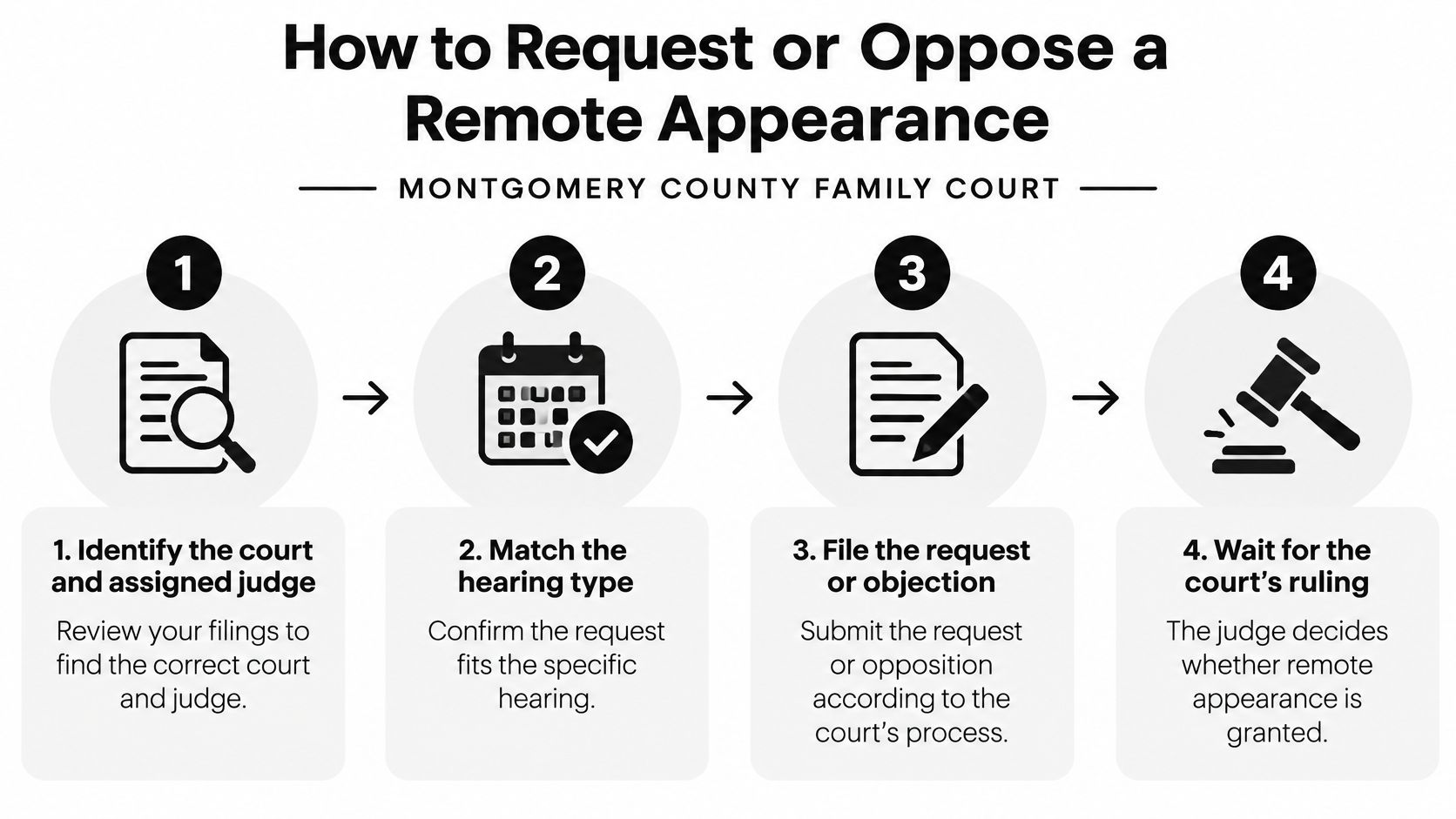
Identify the court and assigned judge from your filings. Match the case number and hearing notice to the correct court. A request sent to the wrong coordinator may leave your actual setting unresolved.
Read the current standing order and individual instructions. Determine whether you're requesting attendance, testimony, or a particular hearing format. The common mistake is using a general remote-appearance request for something that needs separate witness approval.
File a written motion or request through the required process. Identify the hearing date, explain the reason, and describe the device, connection, and location you propose to use. Don't wait until hearing week to investigate a problem you've known about for some time.
Serve the other side and state their position accurately. Note whether opposing counsel or the self-represented party agrees, objects, or hasn't responded. Silence isn't agreement, and a private email to the judge isn't a substitute for proper service.
Address any objection with specific facts. If you're requesting remote attendance, explain how testimony and exhibits can be handled fairly; if you're opposing it, identify the practical obstacle and requested alternative. Avoid turning a format dispute into a list of unrelated grievances.
Obtain and preserve the ruling. After approval, save the written authorization and the connection instructions together. An emailed meeting invitation alone shouldn't be your proof that the court granted the request.
Test the proposed setup before hearing day. Check Zoom, your microphone, camera, charger, internet connection, and private room. Testing on a different device or network won't tell you whether your actual setup works.
This process graphic can help you keep the request and ruling separate.
Keep the requested relief clear
Sample request language: I request leave to appear remotely at the hearing set for [date] because [specific reason], using [device and connection] from a private location.
A matching objection could say: I object to the proposed remote appearance because [specific testimony, access, or exhibit problem], and request [in-person attendance or another workable arrangement]. These are starting sentences, not complete motions or substitutes for the court's required form.
A persuasive request explains how the hearing can proceed fairly, not just why travel would be inconvenient.
A complete filing identifies the person seeking permission, the particular setting, the reason, the proposed arrangements, the opposing side's position, and the relief requested. Use the applicable filing timetable rather than assuming every remote request follows the same deadline.
Remote Witnesses and Live Testimony Explained
Appearing remotely, presenting live testimony remotely, and having a matter decided by submission are different procedural choices. Each format changes how evidence reaches the judge, so the format you request should match what your proof requires.
Plan testimony and document access together before choosing the requested format. Decide who must testify, which exhibits they need in front of them, and how the court will mark those exhibits while the witness is on camera.
Match the testimony plan to the setting
What kind of setting is it? A status conference may concern scheduling and case management. An evidentiary hearing or final trial may require the judge to hear disputed facts, assess credibility, and consider exhibits.
Who needs remote permission? Identify whether the request concerns a party, an expert, or a fact witness. A separate request may be needed for each person you intend to call.
Will the other side object? Ask through the proper process and explain the specific proposal. A witness who is out of the area or has a documented medical limitation presents a different request from someone who prefers not to travel.
Does the matter need live testimony at all? A submission setting generally asks the judge to decide from the properly filed materials. It isn't a chance to offer unexpected oral testimony through a meeting link.
The Montgomery County judicial rule published for Judge Kelly Hughes Norsworthy generally requires remote-witness motions at least seven days before the hearing, provides a one-business-day filing period when notice arrives later, allows requests fewer than 72 hours before the hearing to be treated as untimely absent leave, and generally directs matters without live testimony to submission with 10 days' notice. Confirm that this particular rule governs your setting.
Prepare for a ruling either way
If the opposing party objects, the judge decides the request. Explain how the witness will hear questions, view exhibits, remain available, and testify without prompting from someone off camera.
Custody and enforcement disputes require particular care when the parties disagree about what happened. Convenience matters, but it doesn't resolve concerns about credibility, interruptions, or access to the same documents.
The firm's guide on presenting evidence in court can help you organize the evidence side of your preparation. For each exhibit, draft the foundation questions in advance: how the witness recognizes the document, who created or kept it, and how it will be marked and displayed on the record.
For additional viewing alongside your testimony preparation:
Your remote-witness request should make these points easy to find:
- Witness identity. Provide the name and role in the case.
- Reason for the request. Explain the specific barrier to physical attendance.
- Hearing details. Identify the setting at which testimony is proposed.
- Fallback arrangement. Explain what you'll do if the judge requires in-person testimony or the connection fails.
Tech Problems, Privacy and Link Failures
Equipment failures, missing passcodes, and privacy concerns all follow the same rule: tell the court, propose a remedy, and keep preparing until the judge changes the setting. A remote appearance exists by court approval, so an access problem is a matter for the court to solve.
If you lack workable internet, a suitable device, or a private place to participate, report the problem before the hearing. The same applies when disability-related limitations, incarceration, language access, or difficulty handling exhibits prevents meaningful participation.
Describe the obstacle rather than saying you can't use Zoom. Tell the clerk and court what fails, what resources you have, and what assistance you're requesting, while following service requirements for any request for relief.
Ask for a workable accommodation
Montgomery County's recertification materials describe judges first considering whether an in-person hearing is necessary and then weighing accommodations when a participant can't participate remotely. The possibilities include a courthouse device, audio participation, an out-of-court sworn statement where legally permitted, or a continuance when no effective accommodation exists.
Your judge still decides which arrangement your case receives, so confirm the current process and explain why a proposed accommodation would address your particular barrier.
Each option trades one problem for another. A courthouse device solves an equipment gap but still requires transportation and childcare. Audio participation eases a bandwidth problem while making exhibit review harder. Request a sworn statement only where the law permits it, and let the court decide whether testimony in your case can proceed on paper.
Keep supporting material available, such as an error screenshot, an explanation of connection instability, or appropriate documentation of a functional limitation. Ask the clerk how the court wants medical or other sensitive records submitted before sending them through an informal message.
Keep preparing until the court changes the setting. Report the access failure, ask for a specific remedy, and preserve the request.
Protect sensitive testimony
Remote access operates under courtroom broadcast limits. Under Government Code Section 21.014, the Texas courts' electronic-hearing guidance identifies limits on electronic transmission or broadcasting of specified proceedings, including certain Family Code protective-order matters involving evidence depicting or describing sexual acts, unless required notice and express consent requirements are satisfied.
That distinction matters when a family case involves protective orders, family violence allegations, or sensitive testimony. Approval to attend remotely covers attendance only; recording, livestreaming, or redistributing the proceeding requires separate authorization.
Ask how the court will manage access if safety or privacy is a concern. Use headphones where appropriate, keep unauthorized listeners away, and don't forward meeting credentials to friends or relatives on the assumption that anyone may enter.
When a connection fails during a scheduled hearing
A parent in Panther Creek opens the court's Zoom invitation and hits a passcode prompt. No passcode appears in the notice, and repeated attempts do not get the parent into the hearing.
The parent should contact the clerk and court immediately, identify the case and setting, and describe the missing passcode. Save screenshots, preserve the invitation, and log the attempted connections and messages rather than assuming the hearing has been canceled.
The Texas courts' public-access guidance for remote hearings recognizes reasonable notice and access in remote proceedings. Ask for corrected connection information, instructions, or a continuance when necessary; the judge decides the remedy.
Remain reachable while seeking help. If you're represented, notify your lawyer immediately so counsel can address the problem through the appropriate channel.
Avoid preventable courtroom problems
Device and connection testing belongs to the request stage; on hearing day, conduct is what remains. The published local remote-proceeding rules treat Zoom as a virtual courtroom, require courtroom decorum and dress, prohibit children on Zoom, and prohibit hybrid Zoom/in-person hearings or trials under those rules. Check whether those provisions govern your assigned court.
- Arrange childcare. A child entering the frame or listening nearby can interrupt testimony and expose the child to adult disputes.
- Confirm every participant's format. Leave it to the court to decide who appears physically and who appears electronically rather than arranging a split format on your own.
- Dress and behave for court. Give the hearing your full attention and stop other tasks while the judge is speaking.
- Follow individual procedures. Keep the judge's instructions accessible rather than relying on what worked at someone else's hearing.
Confirm Your Court and Order Before Your Next Hearing
The best preparation produces a clear answer to practical questions: where you're appearing, what you're asking the judge to decide, who must testify, and what you'll do if technology fails. Keep those answers with your hearing notice and filed documents.
What to do next
- Identify your court and judge. Check your case paperwork and hearing notice.
- Read the controlling instructions. Review the current remote standing order and hearing-specific directions.
- Choose the right request. Determine whether you're seeking attendance, witness testimony, or a decision without live testimony.
- Complete the filings. Calendar the applicable deadlines, serve the other side, and save confirmations.
- Prepare your setting. Test your device and connection, secure a private room, and arrange childcare.
- Keep a fallback ready. Save court contact information and promptly report any access failure.
Use this visual checklist when reviewing your appearance arrangements.
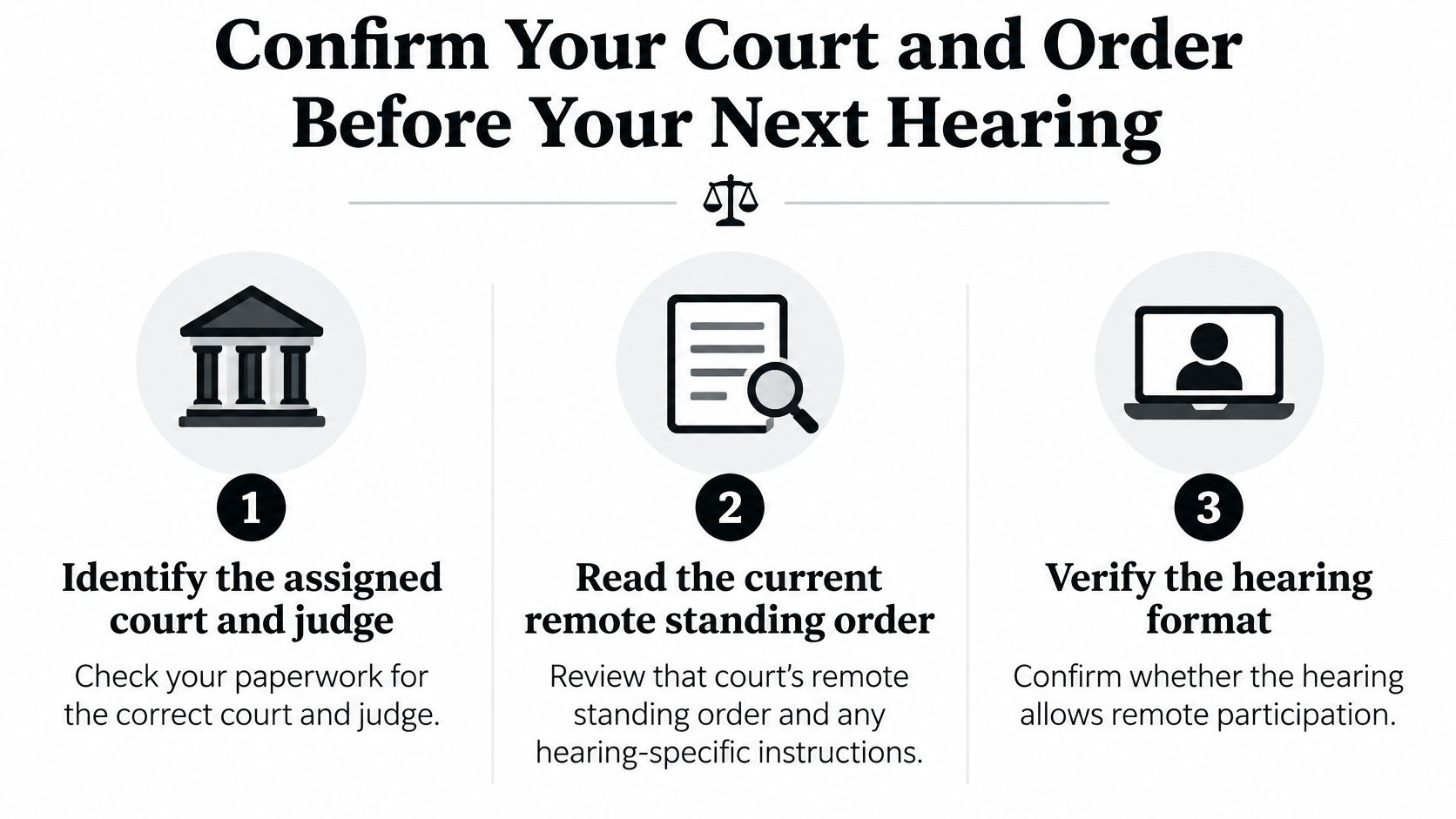
Don't leave an unresolved request sitting in your email inbox. Confirm that the court has ruled, and keep the authorization somewhere you can reach without searching through messages during the hearing.
This article provides general information about Montgomery County remote hearing practice, not legal advice. Rules and judge preferences can change, and the correct approach depends on your case, hearing notice, and current court orders.
Our Woodlands office is located at 25211 Grogans Mills Rd, Suite 275, The Woodlands, TX 77380. Bring your hearing notice, relevant orders, and any pending remote-appearance request when discussing your situation.
The Law Office of Bryan Fagan offers a free consultation to discuss your circumstances and legal rights, including questions about preparing for a Montgomery County family-court hearing, with discussions confidential under the attorney–client privilege. Call (281) 819-1726 or visit The Law Office of Bryan Fagan to schedule through our online contact form.
