 Skip to content

You transmit a divorce answer or custody modification from The Woodlands late at night, and eFileTexas returns it with a clerk code like wrong filing code or missing required fee. That message controls your deadline, not the generic rejected stamp.
A Montgomery County eFiling rejection in a family case depends first on what kind of notice you received. A rejected document means the clerk saw a defect in the pleading itself. A rejected envelope means the package data was wrong. A provider-level hold means the filing never reached the clerk, so no filing date was preserved.
Read the Rejection Notice Before You Act
Most rejections are correctable. That doesn't mean they're harmless, especially when a hearing, answer date, or temporary orders deadline is close.
Start with the notice, not the portal. Open the rejection message, the filing envelope, and the submission receipt, and save all three where you can find them again. You're looking for the exact defect the clerk named, the date and time you transmitted, and whether the clerk gave you a deadline to fix it.
Separate the Document From the Envelope
The document is the pleading, motion, exhibit, or proposed order itself. The envelope is the electronic package that carried it, with the court, cause number, filing code, fees, parties, and service contacts. A document problem might be a locked PDF or a missing signature. An envelope problem might be the wrong case category or the wrong party mapped for service.
Under the Texas statewide electronic filing rules, an electronically filed document is generally deemed filed when it is transmitted to the filer's electronic filing service provider, a transmission on a Saturday, Sunday, or legal holiday is generally deemed filed on the next nonholiday weekday, and a filing submitted before midnight in the court's time zone on the deadline is considered timely unless a statute, rule, or court order sets a specific time. That's why your receipt matters as much as your pleading.
Practical rule: Before you change any file, answer two questions in writing. Did my transmission complete, and what exact defect did the clerk name?
Rejection Notice Types and First Moves
| Notice you see | What it usually means | Filing date status | First move |
|---|---|---|---|
| Return for correction | Clerk named a defect and set a correction deadline | Original date can be kept if corrected inside the window | Fix only the named defect and resubmit as a copy of the filing |
| Provider rejection before clerk review | Filing never reached the clerk | Check the receipt to confirm whether transmission completed | Confirm the transmission record, then resubmit |
| Accepted, pending clerk review | Filing is in the clerk's queue | Filed on the transmission date | Monitor the envelope status; don't resubmit |
| Refusal with no correction window | Document refused outright | Confirm status with the clerk in writing | Call the clerk and consider counsel if a deadline is close |
Common defects include an improperly formatted or non-searchable PDF, incorrect case information, missing required documents, an incorrect filing code, unpaid fees, or inadequate handling of confidential information. If your notice names one of those and gives you time to correct it, correct and wait for acceptance. If it shows no correction window, or your submission never reached the clerk, a phone call comes before another upload.
Pre-Resubmission Checks for Each Family Filing
The fastest way to get a second rejection is to upload the same merged file again without changing the flagged field. I'd slow down for ten minutes and check the whole package, because a clerk who finds one defect may not list every other problem in the envelope.
Field-level accuracy matters more than PDF polish. A clean, searchable document attached to the wrong cause number, court, or filing code still goes nowhere useful. Confirm those fields first, then look at the files.
What to Check Before You Touch Resubmit
- Court and case type: Match them to the cause number on your existing Montgomery County case.
- Filing code: Pick the code for the specific document you're filing, not the closest label.
- Lead document: Make it a searchable, accessible PDF that opens without a password.
- Signatures and certificates: Confirm every required signature, verification, certificate of service, and proposed order is present.
- Sensitive information: Remove or redact identifiers where required before uploading.
- Parties and service contacts: Confirm the filing party, opposing party, and counsel are mapped to the right people.
The Texas Young Lawyers Association guide to e-filing documents states that filings transmitted electronically before midnight in the court's time zone are generally timely. It doesn't promise acceptance, so preserve your transmission receipt, watch the envelope status, and respond right away to any return notice. There's no value in guessing at an acceptance rate for Montgomery County resubmissions. Your own envelope status is the record that counts.
Attorneys are required to e-file family matters in Texas, while self-represented filers are encouraged but not required to do so. That distinction changes who should fix the problem and how. If you have counsel, send the notice to your lawyer the same day rather than experimenting in the portal. If you're self-represented, use the check tied to your filing type and keep your corrections narrow.
You can also compare your package against the Montgomery County family court required forms at filing for The Woodlands so a missing supporting document doesn't trigger a second return.
Pre-Resubmission Checks by Family Filing Type
| Filing type | Check before resubmitting | Common error |
|---|---|---|
| Divorce petition | Court, case type, filing code and required disclosures attached | Wrong filing code or case category |
| Custody modification | Cause number, parties and service contacts match the case | Old or mismatched cause number |
| Child support modification | Cause number and income exhibits legible and searchable | Locked or unreadable scanned exhibits |
| Proposed order | Uploaded as a separate document with its own code | Merged into the motion as one file |
| Certificate of service | Opposing party and counsel mapped correctly | Opposing party missing from service list |
| Enforcement motion | Cause number and hearing references current | Outdated order references |
For custody filings, that cause number check is tied to the existing suit affecting the parent-child relationship. Don't open a new envelope with a new case category just because the first one came back. Fix the flagged field in the existing transaction when the system lets you.
How to Correct and Resubmit Inside the Correction Window
Treat a return for correction as a timed repair, not a fresh filing. The goal is to keep the resubmission connected to the original transaction and get it accepted before the deadline in the notice.
Under the Texas statewide rules governing electronic filing, the clerk generally must identify the conformity problem and provide a resubmission deadline, and the correction period generally should not exceed 72 hours. The same source explains that a filer can copy the original filing, correct it, and resubmit with the original file date for a period not exceeding 72 hours from return for correction.
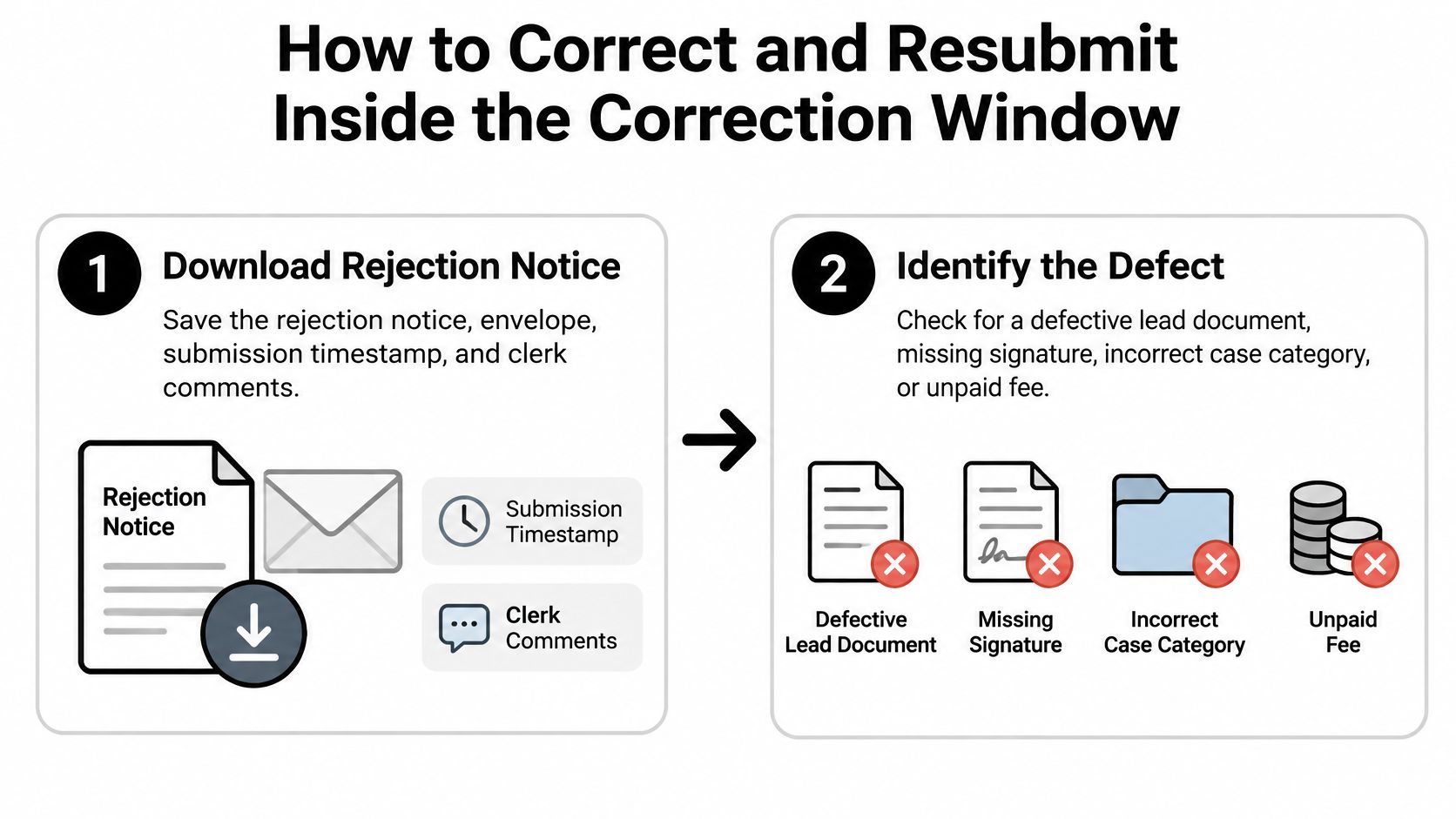
Six Steps in Order
Save everything first. Download the rejection notice, envelope, submission timestamp, and clerk comments. If you later need to prove when you transmitted, screenshots taken weeks later are weaker than the original records.
Name the defect in one sentence. Decide whether it's a defective lead document, missing signature, incorrect case category, improper fee, unreadable or locked PDF, invalid service designation, or prohibited confidential information. If you can't name it, you're not ready to resubmit.
Correct only the stated defect. Keep the original pleading, exhibits, proposed order, and attachments otherwise unchanged. Rewriting the motion while you fix a PDF creates a new question about which version was filed and served.
Use the copy filing function. Use copy filing or the equivalent option when it's available, so the corrected envelope stays connected to the original transaction. Don't merely upload a brand-new filing without explaining the correction when a deadline is close.
Resubmit before the stated deadline. Calendar the date and time from the notice, not from memory. Electronic filing by itself doesn't extend the underlying legal deadline in your divorce, custody, or support case.
Verify acceptance. Check that the returned envelope shows acceptance, a file stamp, and the correct cause number. A new submission receipt alone isn't the finish line.
A healthy result is boring. The envelope says accepted, the file-stamped copy shows the right cause number, and the document you serve matches the document the clerk accepted.
A Short Real-World Scenario
Say a mother in Panther Creek transmits a child support modification at 11 p.m. on a Friday before a Monday deadline. On Monday she gets a return notice saying her scanned income exhibit is locked and unreadable. Her pleading itself isn't flagged.
She saves the notice and Friday receipt, copies the original filing, and leaves the motion and proposed order untouched. She re-saves only the income exhibit as a searchable PDF, checks that it opens and that the text can be selected, and resubmits Monday inside the window stated in the notice. When the envelope comes back accepted with a file stamp and the correct cause number, she serves that accepted version and keeps the Friday receipt with it.
That sequence works because she fixed the named problem without creating a second one. If the same rejection had put a temporary orders hearing or emergency custody request at risk, resubmitting alone might not have been enough. She would also need to preserve proof of timely transmission and promptly ask for appropriate relief.
What Not to Do
Don't combine several pleadings into one lead document to save time. Don't rename the same locked scan and hope the clerk opens it differently. And don't wait until the last hour of the correction window to discover that a fee, signature page, or service contact is still wrong.
Contact the Clerk and eFileTexas Without Losing Time
Call with paper in hand. A clerk can't help you quickly if the conversation starts with a general description of a rejection and no cause number, envelope number, or transmission time.
Have the notice, receipt, and envelope open before you dial or write. Then keep the question narrow.
A Phone Script That Gets to the Point
"I'm calling about cause number [number] in Montgomery County. I transmitted [document name] on [date] at [time], envelope [number]. The return notice names [defect] and gives a correction deadline of [date and time]. If I correct only that defect and resubmit as a copy filing by that deadline, will the original filing date hold?"
Write down the answer while you're on the call. If the person you speak with can't answer that question, ask who can and note the name.
A Short Email Template
Subject: Cause No. [number], correction request, envelope [number]
Body: "I transmitted [document] on [date] at [time]. The return notice dated [date] names [defect] and states a correction deadline of [date and time]. I have corrected [specific change] and plan to resubmit as a copy filing. Please confirm whether any additional step is needed to preserve the original filing date. My callback number is [number]."
That subject line puts the cause number first, which is how the message will be found again. Attach the notice and receipt if the clerk's office accepts attachments by email, and keep your sent copy.
For court-specific procedure, it also helps to review the Montgomery County 410th District Court family docket procedures before you assume every Montgomery County family court handles settings the same way.
How Long the Clerk May Take
The Texas Judicial Branch technology standards for electronic filing provide that a clerk generally must accept, return for correction, or reject an electronically filed document on the same business day it is received, or by the end of the next business day if extraordinary circumstances make same-day processing impracticable. The standard doesn't require processing after regular business hours, on weekends, or on holidays.
For a Woodlands filer, that timing can be uncomfortable. A filing transmitted late at night may not be reviewed until the next business day, and a rejection notice may arrive after the filing deadline has passed. That delay is a reason to file early when you can, not a reason to submit duplicates while you wait.
Use the right contact for the right problem. Call eFileTexas or your service provider for a system failure, a transmission that never completed, or an error before clerk review. Contact the Montgomery County clerk about the named defect, the correction deadline, fees, and whether the filing is in the court's record.
For every contact, log the date, time, name of the person you spoke with, what you asked, and the answer you received. Keep that log with the receipt and envelope number, since those records help establish what was transmitted and when.
Service and Notice After a Rejection
A rejection notice means the court has no filing on record yet. Service built on that rejected version creates a second problem, because the other parent or opposing counsel receives a document with no file stamp and no cause number match to point to.
Service Steps After Acceptance
- Wait for acceptance. Serve only the corrected filing after the clerk accepts it. Use the copy that carries the file stamp.
- Fix any service designation first. If the clerk flagged an invalid service designation, correct the party or counsel mapping before resubmission.
- Serve the right people. Serve the opposing party and counsel of record as your case requires. Keep the certificate of service with the filing.
- Flag deadline changes in writing. If the rejection affects a response date, hearing, or exchange deadline, notify the other side in writing before that date passes. A short, factual notice is better than silence.
Self-represented filers should confirm the service requirements for their specific case type, since e-service expectations can differ for attorneys and self-represented parties. For custody cases, the guide to how to request custody in Texas helps separate filing the case from serving the other parent, which are related but distinct tasks.
Service-Only Checklist After Acceptance
| When | Action | Record to keep |
|---|---|---|
| After acceptance | Confirm the file stamp and serve the corrected filing | File-stamped copy |
| Same day as service | Notify the opposing party in writing if a deadline shifted | Written notice |
| After service | File proof and keep it with the rejection notice and receipts | Certificate of service |
When to Ask the Court for Relief
A rejection notice tells you the filing did not enter the record. Copy the cause number, envelope number, filing date and time, rejection date, clerk name or initials, and the exact rejection reason into any request for relief. That detail lets the judge see what failed and when.
Resubmission fixes a defect. Protection of a deadline takes a separate request when time runs short.
The eFileTexas frequently asked questions explain that the clerk may return a submission for correction and that associated fees are refunded. A return means no accepted filing exists in the court record. Your proof of transmission matters here. Keep the rejection notice, the envelope history, timestamped receipts, and any system message that shows whether the problem was a rejected document, a rejected envelope, or a provider failure that never reached the clerk.
Four Situations That Need More Than a Resubmission
Ask the court for relief when a temporary orders hearing is set before the correction window closes. Do the same for an emergency custody request, a limitations or response deadline placed at risk, or a rejection that arrives after the deadline has already passed. In each situation, attach the rejection notice, envelope history, timestamped receipts, and any system message that shows what happened.
Match the request to the governing law. Conservatorship and possession issues fall under Texas Family Code Chapter 153, while enforcement proceedings are addressed in Texas Family Code Chapter 157. A support modification has its own requirements, so cite the chapter that governs the relief you are requesting. Keep the e-filing problem as the procedural explanation rather than the whole motion.
Two requests get confused. A motion for extension or reset explains the technical failure and asks the court for more time or a new setting. A nunc pro tunc request asks the court to correct the record to reflect what the court did. It cannot create a timely filing that the rules did not allow, and I recommend treating it as a narrow record correction, not a fix for a late filing.
Relief Options by Situation
| Situation | Relief to request |
|---|---|
| Temporary orders hearing set before the correction window closes | Motion for a reset or extension, with receipts and the rejection notice |
| Emergency custody request | Emergency motion with proof of timely transmission and a request for an immediate setting |
| Limitations or response deadline at risk | Motion for extension explaining the technical failure |
| Rejection after the deadline has passed | Nunc pro tunc motion to correct the record of what the court did; it cannot create a timely filing |
The Montgomery County Law Library offers no-cost review by a reference attorney for qualifying agreed or default family cases when neither party has counsel. That help fits routine agreed paperwork. It is not built for urgent contested matters, emergency custody requests, or a rejection received days before a hearing.
Deadline problems also show up after an order is signed, when a party needs Enforcement of Court Orders in The Woodlands for enforcing divorce decree and custody order provisions in Montgomery County. A rejected enforcement filing can delay the hearing you need, so the proof and timing work in this guide still matters.
Decide Within 24 Hours Whether to Resubmit or Call Counsel
I'd use one decision rule. Resubmit on your own when the notice names a single correctable defect, you understand exactly how to fix it, and the correction deadline still gives you room to verify acceptance. Call counsel the same day when a hearing, temporary order, emergency custody issue, or limitations date is close, or when the notice is a refusal with no correction window.
That rule is stricter than it sounds. A wrong cause number in a routine filing with weeks before the next setting is one thing. The same mistake in an emergency custody filing due tomorrow is another, because the consequence of guessing wrong is different.
What to Do Next Checklist
- Save the records: Keep the notice, envelope, receipt, and timestamps in one folder.
- Confirm transmission: Verify whether the filing reached the clerk or stopped with the provider.
- Write down the defect and deadline: Copy the clerk's stated reason and correction date exactly.
- Correct only that defect: Don't rewrite the underlying pleading during the repair.
- Resubmit and verify: Confirm acceptance, the file stamp, and the correct cause number.
- Log every contact: Record each clerk or provider call with the date, time, name, and answer.
- Serve after acceptance: Serve the accepted, file-stamped version and keep proof with the receipts.
If you want local context before deciding, Montgomery County Family Courts: A Local Guide explains how family law cases proceed in Montgomery County courts serving The Woodlands. It's background, not a substitute for checking the orders and deadlines in your own case.
This article is general information, not legal advice. It isn't a substitute for advice about your specific facts, your court's orders, or a deadline that may already be at risk, and reading it doesn't create an attorney-client relationship. Filing rules and local procedures can change, so confirm current requirements before you rely on them.
If you're in The Woodlands, Panther Creek, Alden Bridge, Sterling Ridge, Conroe, Magnolia, or elsewhere in Montgomery County and a rejection is threatening a hearing or deadline, you don't have to sort it out from a portal message alone. The Law Office of Bryan Fagan offers a free consultation that can be booked from the website. You can schedule by calling (281) 819-1726 or by filling out the firm's online contact form, and you can discuss your situation confidentially under the attorney-client privilege during that consultation.
If a Montgomery County rejection has put your divorce, custody, support, or enforcement deadline in doubt, The Law Office of Bryan Fagan can review the notice, your transmission records, and the next court date with you and explain whether a corrected resubmission or a motion for relief fits your situation. To schedule a consultation, visit The Law Office of Bryan Fagan and bring the rejection notice, envelope number, and receipts so the conversation starts with the documents that control your deadline.
